Guide
Can you make a fillable PDF in Mac Preview?
Updated 11 October 2026
Short answer: no. Preview is built to fill forms: you can type into a PDF that already has fields, and on a flat PDF you can place text boxes with your own answers. It has no tool for creating named form fields (text, checkbox, signature) that someone else then fills in. For that on a Mac, use LibreOffice (free) or a tool like Fillable.
What Preview can do
- Fill a form that already has fields. Click a field and type.
- Fill a flat form for yourself. Apple's guide says that if a PDF won't let you type into it, you add a text box from the Form Filling toolbar and type your answer there.
- Help with forms automatically. Since macOS Sonoma, Preview can offer an AutoFill Form button that fills details from your contact card, on PDFs where it recognizes the fields. Apple notes that not every PDF supports it.
What it can't do
- Create a text field, checkbox, date or signature field with a name, for someone else to fill.
- Mark a field as required, set its font size, or add date formatting.
- Turn the boxes you add into AcroForm fields. They are your answers, drawn on the page as annotations. A university IT help page notes that answers saved from Preview can show up as comments when the file is opened in Acrobat.
| Task | Preview | LibreOffice Draw | Fillable |
|---|---|---|---|
| Type your own answers on a flat form | Yes | Yes | Makes it fillable; then type in any reader |
| Make a form others can fill | No | Yes, by hand | Yes, fields are found for you |
| Checkboxes and signature fields | No | Checkboxes yes | Yes |
| Cost | Free, built in | Free | Page 1 free, $4 per form |
Free on a Mac: LibreOffice Draw
- Install LibreOffice for macOS from libreoffice.org and open the PDF with File > Open.
- View > Toolbars > Form Controls, then switch on Design Mode.
- Draw a Text Box or Check Box over each blank, and name each one in Control Properties (right-click).
- File > Export as PDF, tick Create PDF form on the General tab.
- Open the result in Preview and click into a field to check it.
On a Mac with Fillable
Fillable runs in Safari, Chrome or Firefox; nothing to install. Choose the PDF, check the fields it found, and download. Page 1 is free (with a small "Made with Fillable" line at the bottom), so you can open it in Preview and click through the fields before paying $4 for the whole form.
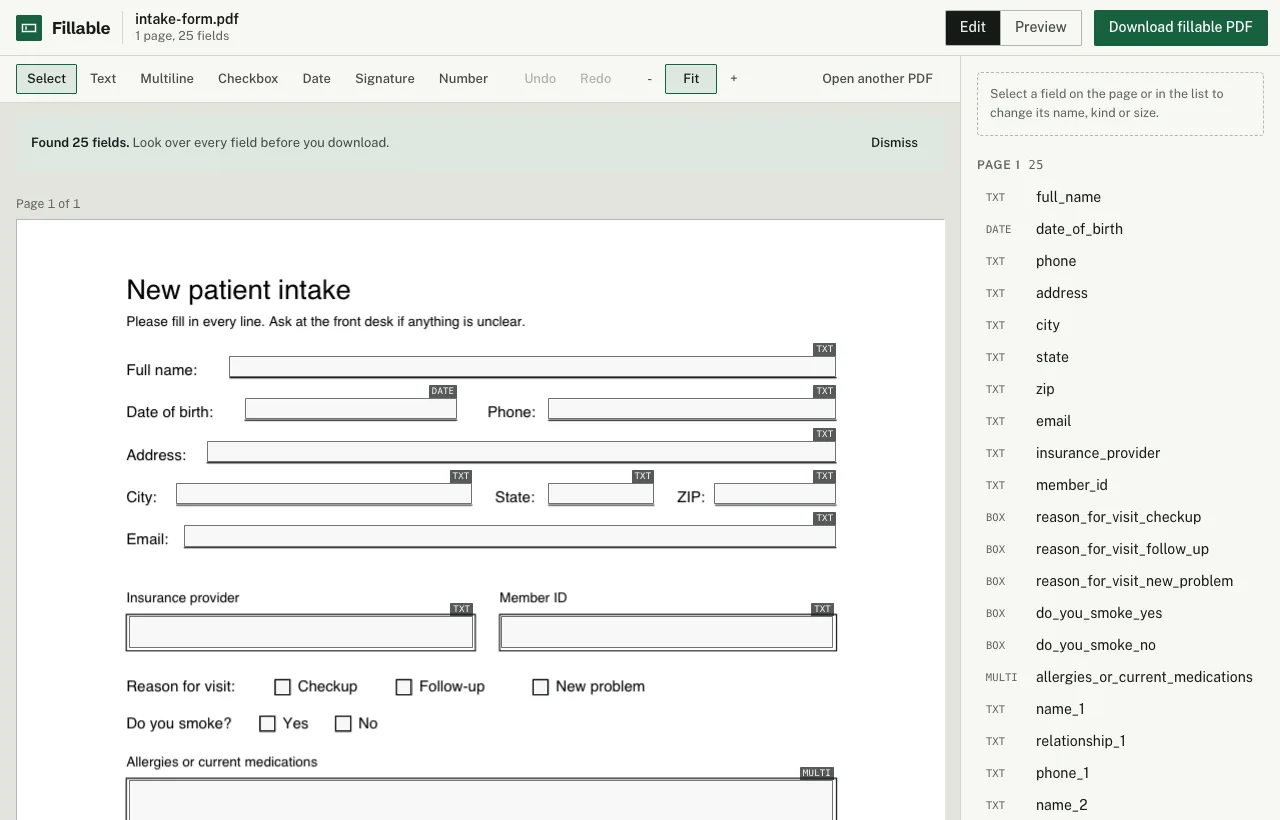
Fillable finds the lines, boxes and checkboxes in your PDF in the browser, lets you fix them, and gives you back a real fillable PDF. Page 1 is free to download (with a small "Made with Fillable" line at the bottom), so you can try it in your own PDF reader. The whole form without that line is $4, once. No account, no subscription.
Make your form fillable